Last week I was playing around with an applet that required me to pause the camera while it was in preview mode on a key press. Sounds simple enough !!!
To Pause the Camera
1) Check if the camera is in preview mode.
if(SUCCESS != ICAMERA_GetMode(pMe->m_pCamera, &lMode, &bPaused))
return;
if (CAM_MODE_PREVIEW == lMode && !bPaused)
{
//Pause the Camera
ICAMERA_Pause(pMe->m_pCamera);
}
2) The above call should return the status of CAM_STATUS_PAUSE in the callback
Function of the camera control. The AEECameraNotify structure will contain the following values.
nStatus = CAM_STATUS_PAUSE
nCmd = CAM_CMD_START
nSubCmd = CAM_MODE_PREVIEW
Do any thing that you want to do while the camera is paused here.
To Resume the Camera
1) The resume call will place the camera back in the preview mode. The process is similar to the call to the Pause function.
if(SUCCESS != ICAMERA_GetMode(pMe->m_pCamera, &lMode, &bPaused))
return;
if(CAM_MODE_PREVIEW == lMode && bPaused) //check for pause
{
//Resume the Camera
ICAMERA_Resume(pMe->m_pCamera);
}
2) The above call returns the status CAM_STATUS_RESUME in the callback function of the camera control. The AEECameraNotify structure will contain the following values.
nStatus = CAM_STATUS_RESUME
nCmd = CAM_CMD_START
nSubCmd = CAM_MODE_PREVIEW
Once you receive this callback, the applet should automatically start receiving the callbacks with CAM_STATUS_FRAME.
Handling Suspend (EVT_SUSPEND) and Resume (EVT_RESUME) Events.
Conventional wisdom dictates stopping the camera altogether and releasing the reference to the ICamera interface when your applet receives a EVT_SUSPEND event.
NEVER NEVER NEVER let your applet release the reference to the ICamera interface when the camera is in paused state. When you receive the EVT_SUSPEND event make sure the camera is not in the paused state, if it is then put in a call to ICAMERA_Resume(). Do not know if this is a bug or a feature (J) in the ICamera but once you put the camera in the pause state and release the reference, you need to restart the device to be able to use the camera again.
case EVT_SUSPEND:
if(SUCCESS == ICAMERA_GetMode(pMe->m_pCamera, &lMode, &bPaused))
{
if(CAM_MODE_PREVIEW == lMode && bPaused)
{
ICAMERA_Resume(pMe->m_pCamera);
}
}
//you could call ICamera_Stop(), but it works without it.
ICAMERA_Release(pMe->m_pCamera);
pMe->m_pCamera = NULL; //Always a good idea to null it out.
return TRUE;
Tuesday, August 02, 2005
Saturday, July 16, 2005
Starbucks and My Name
I am all for the Starbucks policy of putting ur name on ur glass when u order so that there are no mixups..but... the name "Punit" has been taking a beating lately. These are some of the interpretations of my name taken from my handy Nokia 6260.
These days I have begun to look forward to my Starbucks Name of the Day. :-)

"B" .. I am just going to put "B" is that ok ...

is it "Benit" ???.... Did u say Benit ???

Poni... I am sorry "Noni" ......

"Blinit" ... interesting name ...
These days I have begun to look forward to my Starbucks Name of the Day. :-)

"B" .. I am just going to put "B" is that ok ...

is it "Benit" ???.... Did u say Benit ???
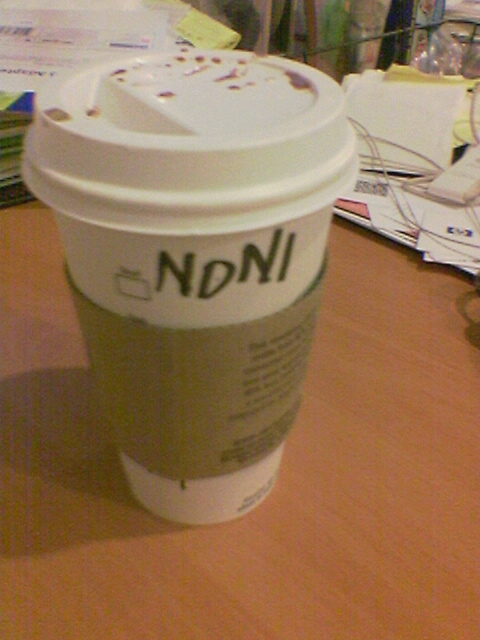
Poni... I am sorry "Noni" ......
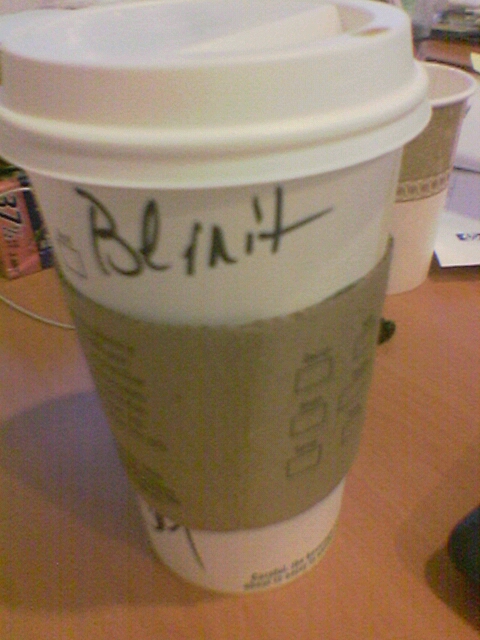
"Blinit" ... interesting name ...
Monday, July 11, 2005
BREWDIR Launched
Have been meaning to do this for some time now and finally got around to doing it. The site BREWDIR has officially launched today :-)
Sunday, July 03, 2005
QRCode Blog
My infatuation with the Japanese mobile technology continues :-)... This is a site that has all its blogs in the form of a QR code. The text of the blog has been encoded into a QR Code. I don't get the practically behind the site ...but then I don't think that it was meant to be practical at all :-)...
If only the text in the code wasn't in Kanji script, I could read what's actually written in the blog.
Check it out : QRCode Blog
If only the text in the code wasn't in Kanji script, I could read what's actually written in the blog.
Check it out : QRCode Blog
Friday, July 01, 2005
ICamera Preview Mode: Recieve SMS or In coming call
Got my app back from NSTL stating this bug:
" If the application has the camera in the preview mode and an incoming voice call is received, then the handset’s ringer is distorted. "
This is something I will have to look at in the future and try it out with the other handsets but for now a temporary fix ( thanks to Ilho) has done the job. When I start the camera I register for a notification:
ISHELL_RegisterNotify(pMe->pIShell, AEECLSID_MYAPPLET_ID,AEECLSID_TAPI, NMASK_TAPI_STATUS NMASK_TAPI_SMS_TEXT);
and when I stop the camera internally, I unregister for the notification:
ISHELL_RegisterNotify(pMe->pIShell, AEECLSID_MYAPPLET_ID, AEECLSID_TAPI, 0);
In my main applet handle event function I have dumped in some code to shutt off the camera as soon as you get an incoming SMS or Phone call.
case EVT_NOTIFY: {
AEENotify * ns = (AEENotify *)dwParam;
if(NMASK_TAPI_STATUS == ns->dwMask NMASK_TAPI_SMS_TEXT == ns->dwMask){
//Shut off the camera and show a pause screeen
// If user accepts the incoming call or reads the message then the applet
// will recieve a EVT_SUSPEND event. Else have the Select key ready to
// activate the camera on the pause screen.
}
return TRUE;
}
Note: Set the privelege level in the MIF to have access to TAPI.
Subscribe to:
Posts (Atom)