Thursday, March 12, 2009

UpcodeWorld : Virtual Competition

UpCode is offering a chance to win 100 Euros, all you have to do is download the UpCode reader (available here), on your phone (supported list) and scan a UpCode. 

The idea behind the competition is that you scan a upcode and then embed another picture onto the scanned code image (mashup) and upload this mash to the site. The number of votes on a picture will decide who wins the prize on May 1st 2009.

Its a neat idea to get the people to download more readers, but there are just too many manual steps.  You can get the details of the competetion on the UpcodeWorld site. 


UpCode is a 2 D barcode designed to be scanned from mobile phones like the Ezcode and BeeTagg codes.  The UpcodeWorld site is the place you go to create your own Upcode.  I guess the system is still under development as of now. 

Web as a mobile Enterprise Application Pllatform

John Huffman wrote up a interesting post on why the web (WAP) platform is just not cut out for enterprise applications as yet. He points out the following reasons for the thin client approach not making the cut:

"Latency - The first big obstacle was the screen refresh problem. Any time we wanted to change application state required a round trip to the server and a screen refresh. With AJAX this is better, but it does makes development more difficult.

Device Features - One of the main reason that we people use mobile devices is for all of the cool features such as barcode scanning, magnetic stripe readers, cameras, video, messaging, etc.   Not to mention a pretty powerful CPU, persistent storage, and the other features of a portable computer. With web apps, you are generally limited to the functionality of your browser. To some extent you can get around this with ActiveX controls and third party browser extensions such as Motorola’s PocketBrowser, but this is all custom.
Bells and Whistles -Audio is a critical component of Enterprise applications. For some reason Microsoft all but eliminated sound from the mobile web. Without audio cues, alerting users of errors is less effective. Again we can use third party tools for this such as PocketBrowser, but…
Web Standards Support - Here’s another big frustration area that drives developers crazy. It’s only natural that the Microsoft developers made some trade offs when they implemented the mobile browsers, but clearly they weren’t targeting it as an application platform from their choices. Take the single window limitation, i.e. no popup window for displaying error messages or alerts. Or not supporting absolute position.  While these types of limits don’t prevent development, it just makes things more difficult."

I couldnt agree with him more on the frustration at the lack of support for Web standards.  In the mobile world anything goes including very loose implementation and own interpretation of the standards. Device features is another strong point in the demise of WAP. The WTAI spec seems to have been abandoned, I would have hoped that more URI schemes would be added to support access to camera etc but the mobile browser for now is just not heading in that direction. 

Another approach would be a thin client application that embeds the browser inside it. This still gives you flexibility to modify the interface from the server and the thin client can access the device features. On BREW, IHTMLVIEWER control is something I have used, pretty flexible though it works only with the HTML 4.1 standard out of the box but certain features can be modifed. On most smart phones including Iphone the browser can be embedded inside the app. This gives flexibility to the server component to adapt and modify the user experience with ease.

Original Post: http://www.steponesystems.com/blog/?p=247

Wednesday, March 11, 2009

Blackberry Browser and the CSS setting for WAP pages

The blackberry browser ships with a default setting that turns off the use the CSS style sheets ( and HTML tables). I believe this is done so that the pages load faster. The user can turn on the use of CSS style sheets through options but in my experience a large number of users do not know that this option exists. This can be a pain for wap developers if the wap page is sensitive to be displayed only in a particular style.

I had been struggling with trying to find some HTTP header or something similar that will allow me to detect on the server whether the blackberry browser has the CSS option turned on or not. As expected, did not find any. 

There is another approach, the power of CSS itself can be used to make the user more aware of the options.
The hack would involve:
  1. Come up with text that tells the user that the page is best viewed with CSS turned on. (Possibly add a link to a page that tells the user how exactly to do this).
  2. Setting the style of the information text above using 2 properties : visibility and display.

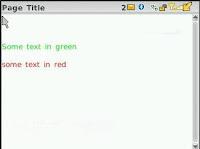
What we do is add a paragraph (p tag) of text that tells the user to turn on the CSS option as shown in our page on the left. You can use any element like Span, a or div. Just make sure you set the style accordingly and the browser supports the html element.

If the CSS is tuned off then the page will display with the all black font etc as shown in the left and our text will be displayed to the user (mission accomplished). 


To hide the text when the user has turned on the CSS setting, we use the properties: visibility and display.
.styletext
{
    font-size: xx-small;
    color: #000000;
    text-align: left;
    visibility:hidden;
    display:none;
}
<p class="styletext" >
This page is best viewed when you turn on CSS on your browser.
</p>
The reason I use both the properties is that I do not know what phone will support which property. The visibility property hides the element and the display property removes the element from the view. The image on the right shows how the page would look when the CSS is turned on by the user. 

Please note that the screen shot is from a blackberry curve and this phone does not seem to support the display css property and hence you see the empty white space on top. The kickstart phone actually removed the white space from the top too.

You will find list of supported CSS properties on the blackberry here. The visibility and display properties are available from browser version 4.6 and later. Do not trust this though. I found that even though the visibility property was supported by all the phones I tested, the display property was only supported by the Blackberry Kickstart (9100).

Phones Tested and this hack works:
- Blackberry Curve
- Blackberry Pearl
- Blackberry Kickstart

Steps for Toggling CSS and Tables option in Blackberry:

1. Open the Menu and select "Options"
2. On the Browser Options screen, select "Browser Configuration".
3. Select / Unselect the "Support Style Sheets" | "Support HTML tables" option.


Tuesday, March 10, 2009

How to Embed almost anything on your HTML page

Amit Agarwal has compiled a excellent list of thingies. A must read for all web developers !!!.

Article: http://www.labnol.org/internet/how-to-embed-in-html-webpages/6365/

SplashURL uses QR codes (SplashQRCode Bookmarklet)

Found this on Tony Hirst's blog.
The Splash Url service seems similar to the tiny url service. It shortens the longer URLS into smaller versions. This can be of help during presentations etc. One feature that Christopher Gutteridge has added is the ability to generate QR codes from these smaller links.
Pretty neat idea. I installed the SplashQRCode bookmarklet on my firefox and it works well. I regularly use the Mobile Barcoder plugin in firefox for all my converting urls to QR codes needs and one problem I always found was that the QR codes for longer urls ( e.g. the urls of blog posts) can get ery long and this leads to a big ass barcode.  Scanning these barcodes is a pain.  Using the Splash URL plugin you get QR codes with decent sizes.
I am currently not sure whether the small urls are stored somewhere on the server and will be available if I scan the QR code say later in the evening. 
One thing I picked up from Tony's blog post was concern over how to monetize the transaction. One idea is, when the user scans the QRCODE, show him a wap page with some branding and adverts. The user can skip this page and go to the final page by clickin the link.  If an institution does not adverts to be shown before its pages, let it pay a fee of say 1 cent a scan. The goal is no money to be charged to the end user  (person who scans the QR code).